
MeldaProduction MAutoPitch Review | Free Auto-Tune Plugin

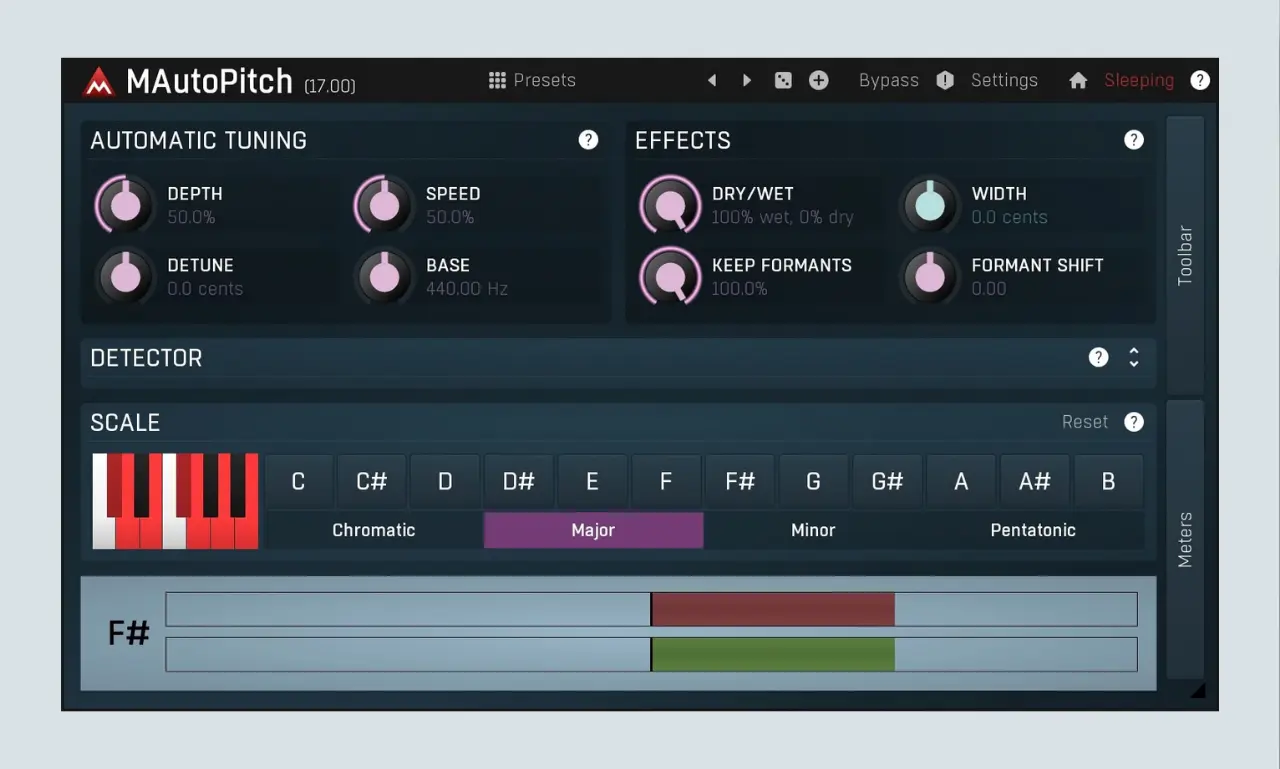
MeldaProduction MAutoPitch is a free automatic pitch correction plugin. It detects and fixes off-key notes in real-time or during the mixing process. It also offers a versatile range of vocal processing options and can handle both transparent and natural pitch fixes.
I tested MAutoPitch on several vocal tracks, and i evaluated its tracking accuracy, sound quality, and formant controls.
Key Controls & Interface
The interface contains several parameters for pitch manipulation.
1. Automatic Tuning
- Depth Control: Sets how accurate the pitch correction is. At 100%, it sounds machine-like and rigidly in tune; lower settings allow natural pitch deviation.
- Speed Control: Determines how fast the plugin reacts when a note changes. Higher speeds snap notes instantly to the grid, while lower speeds offer a more gradual, natural transition.
- Detune (D-Tune): Provides global pitch adjustments in cents for slight offsets or fine-tuning.
- Base Frequency: Adjusts the reference key center frequency (commonly standard 440 Hz, but adjustable from 400 Hz to 480 Hz).
2. Formant Shifting
- Dry/Wet: Blends the original unprocessed voice with the tuned signal for parallel thickness or doubling effects.
- Formant Shift & Keep Formants: Alters vocal tone or gender characteristics (you can make a voice sound lower or higher) without shifting the actual musical pitch.
- Stereo Width: Expands or narrows the stereo field of the processed audio.
3. Detector
Parameter | Core Function |
Threshold | Determines the minimum signal level required for pitch detection. |
Stabilization | Controls how quickly the detector can make large pitch changes. |
Min Frequency | Filters out low-end noise, rumble, and sub-harmonics from detection. |
Max Frequency | Filters out high-end friction, breaths, and top-end harmonics from detection. |
4. Scale & Key Selection
This feature lets you pick specific musical scales (major, minor, pentatonic) or chromatic modes to keep vocals in key.
5. Utilities and Global Settings
- Automatic Gain Control (AGC): Keeps output volume consistent.
- Safety Limiter: Prevents damaging volume peaks above 0 dB.
- Advanced Routing: Supports mono, stereo, surround sound channels up to 8 channels, and ambisonics up to 64 channels.
4 Vocal Tuning Examples with MAutoPitch
i also tested MAutoPitch across different musical genres.
1. Hard Pop & Trap Auto-Tune
For hard trap auto-tune, set the Speed to zero and Depth to maximum. Select the exact root key and scale of your beat. This creates an aggressive and modern vocal effect instantly.
2. Subtle & Natural Vocal Correction
For subtle pop tuning, set the Speed between 40 and 70 milliseconds. Set the Depth to roughly 70%. This corrects minor pitch errors while preserving natural vocal dynamics.
3. Deep Rap Voice & Pitch Drops
I used the Formant Shift knob on lead vocal hooks. I lowered the formants to create heavy, pitched-down rap vocal textures easily.
4. Bright Background Harmonies
I also applied formant shifting to background vocal layers. I put the shifting formants up to make the background harmonies sound wider and lighter.
MAutoPitch vs. Top Competitors
Plugin | Price | Key Strengths | Best For / Limitations |
MeldaProduction MAutoPitch | Free (Pro upgrade available) | Formant shifting, stereo widening, automatic gain control, very low CPU usage. | Power users that want deep technical control. |
Auburn Sounds Graillon 3 | Free / $29 | Extremely smooth natural pitch correction and creative pitch shifting/modulation. | Great zero-budget choice for transparent vocal tracking. |
GVST GSnap | Free | Classic robotic autotune or gentle nudging, MIDI mode. | Simple, lightweight traditional pitch correction. |
Antares Auto-Tune Pro | $450 to $600 (or subscription) | Industry standard, robust real-time tracking, advanced graph mode. | Professional studios with high-end budgets. |
Waves Tune Real-Time | $35 | Direct note direction via arrows above keys, fast workflow. | Affordable, responsive live tracking. |
FAQ:
Does MAutoPitch automatically detect the song key?
No. You must select the root key and scale manually. You can also send MIDI notes to control the pitch.
Can MAutoPitch edit individual notes manually like Melodyne?
No, MAutoPitch is an automatic pitch correction plugin only!
Do I have to install all plugins in the MFreeFXBundle?
No, you can choose to install only MAutoPitch inside the installer options.
Can I use MAutoPitch for live vocal monitoring?
Yes. MAutoPitch features very low latency. It works well for real-time tracking inside your DAW.
How do I reduce latency during live recording?
Lower your DAW buffer size and disable heavy linear-phase plugins on your master bus.
Final Thoughts
MeldaProduction MAutoPitch is an outstanding free vocal tuning plugin. I found its pitch tracking fast, reliable, and smooth on different vocal sessions.
However, its sound quality easily rivals many paid entry-level auto-tune plugins. I recommend keeping MAutoPitch in your vocal processing folder. It remains a must-have free VST plugin for modern music creators.
➤ Supported Formats & System Compatibility
- Plugin Formats: VST, VST3, AU, and AAX.
- Operating Systems: Windows and macOS (64-bit).
- Processor Support: Intel, AMD, and Apple Silicon (M-series) chips on Mac, and SSE2/AVX-optimised processors on Windows.
- DAW Compatibility: Works in major Digital Audio Workstations.
To install MAutoPitch, download and run the MFreeFXBundle installer from the MeldaProduction Downloads page, then use the built-in MPluginManager to select and install the plugin.
➤ You Might Also Like:
- 8 Best Free Autotune VST Plugins for Vocals
- Youlean Loudness Meter 2 Review | Free LUFS Meter Plugin
- Voxengo Span Review | Free Spectrum Analyzer Plugin
- Reason Free Review | Essential Virtual Rack Plugin
- TDR Nova Review | Free Dynamic EQ Plugin

Amine Fariss is an independent audio engineer, music producer, and sound designer with over 20 years of experience working inside commercial and home studio environments. Amine created this platform to test and review VST plugins and music production software to help beginners and professionals build better mixes.