
Voxengo Span Review

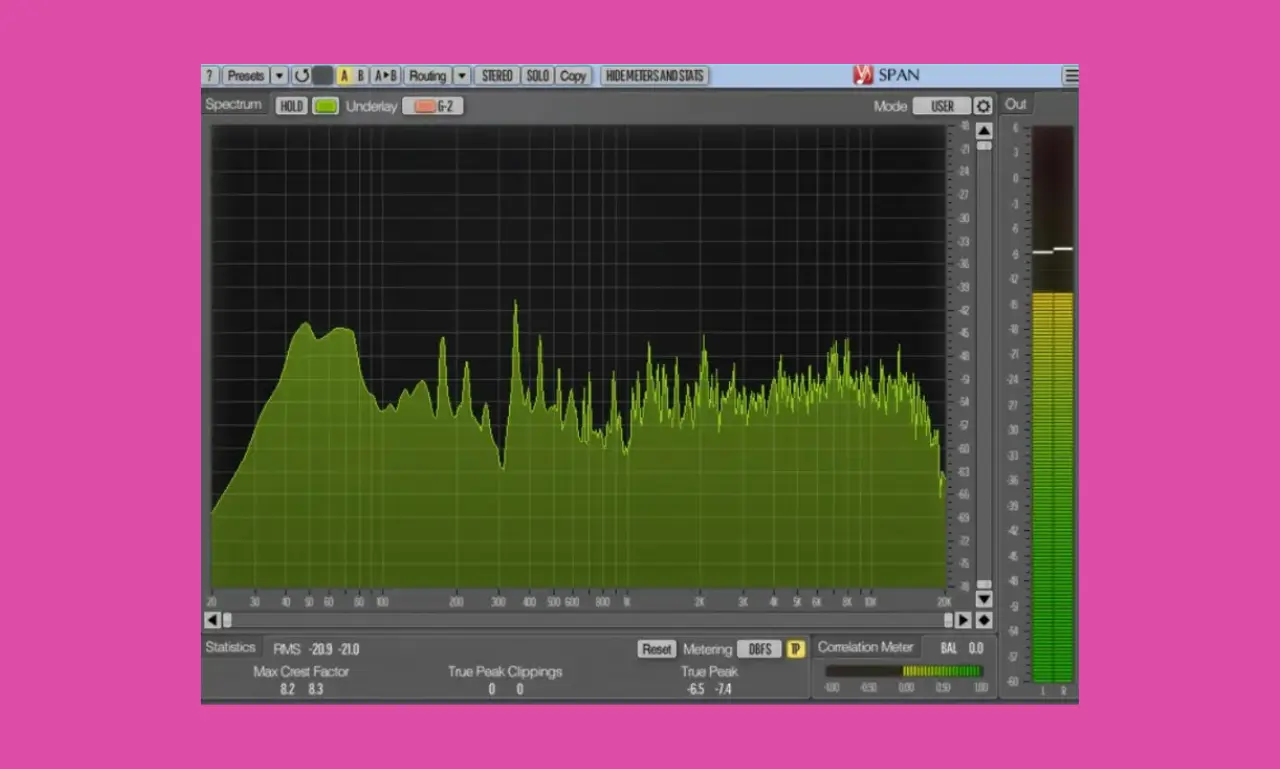
In this Voxengo SPAN review, I’m going to break down why this free audio spectrum analyzer has remained a permanent staple on the master bus of Grammy-winning mixing and mastering engineers for over two decades.
Created by software engineer Aleksey Vaneev, Voxengo SPAN is a free, real-time Fast Fourier Transform (FFT) audio spectrum analyzer. It does not try to look pretty with flashy eye-candy graphics or AI-assisted shortcuts. Instead, it provides scientific, unvarnished, precision data about what is happening across your entire frequency spectrum.
Review Overview
What Is Voxengo SPAN?
➤ The Developer Behind It
Voxengo is an independent audio software company founded by Aleksey Vaneev. Voxengo is revered in the audio engineering world for digital signal processing (DSP) algorithms that prioritize mathematical accuracy, zero coloration, and ultra-low CPU utilization.
While Voxengo sells premium mastering plugins (such as Elephant and GlissEQ), Vaneev has generously kept SPAN as a 100% free utility plugin for the audio community.
➤ What Does Voxengo SPAN Do?
Voxengo SPAN is a real-time Fast Fourier Transform (FFT) frequency analyzer. In simple terms, it takes the incoming digital audio signal, divides it into thousands of tiny frequency points, and draws an instantaneous visual graph of volume (amplitude in dB) across the frequency spectrum (from 20 Hz to 20,000 Hz).
Beyond basic frequency graphing, SPAN includes a comprehensive suite of professional metering tools:
- Peak and RMS Volume Level Meters.
- K-System Metering (K-12, K-14, and K-20 standards).
- Crest Factor Measurement (Peak-to-RMS ratio for dynamic density checking).
- Stereo Correlation Metering (Phase coherence and mono compatibility).
- Mid/Side (M/S) Spectrum Inspection.
Key Features & Interface
At first glance, Voxengo SPAN’s grey, technical interface looks like software designed for a physics laboratory. However, every button and slider serves a distinct purpose.
1. FFT Block Size (Resolution vs. Speed)
In the settings menu (under MODE), you can adjust the Block Size (from 2048 samples up to 65,536 samples).
- Lower Block Sizes (2048–4096): Provide fast, highly responsive visual feedback. This is ideal for catching quick transients in high-hats or percussion, but low-end resolution (sub-bass) appears blurry.
- Higher Block Sizes (16384–65536): Slow down the visual speed slightly, but provide hyper-precise visual resolution in the low end. This feature allows you to differentiate between a 30 Hz sub-bass note and a 45 Hz kick drum fundamental with pinpoint clarity.
2. The 4.5 dB/Octave Slope
By tilting the visual display at 4.5 dB per octave, Voxengo SPAN compensates for how human ears perceive energy across frequencies. When your mix looks relatively flat across the graph in SPAN on a 4.5 dB slope, it will sound balanced, warm, and clear to human ears.
3. Crest Factor Measurement
Next to the RMS meters, the Crest Factor shows the difference (in dB) between the highest peak and the average level indicated by the RMS meters. The Crest Factor displays the mathematical difference (in dB) between the peak volume and the average RMS volume of your track.
- High Crest Factor (12 dB–18 dB): Indicates a highly dynamic mix with lots of punch and headroom (common in jazz, acoustic, or classical music).
- Low Crest Factor (4 dB–8 dB): Indicates a heavily compressed, dense, hyper-loud track (common in modern dubstep, EDM, or commercial pop).
Checking your Crest Factor ensures you don’t over-compress your mix bus or accidentally squash your drum transients.
4. Correlation Meter (Phase Checker)
At the bottom right of the SPAN interface sits the Stereo Correlation Meter, spanning from -1 to +1:
- +1.0 (Green): Perfect mono compatibility. Both channels are completely in phase.
- 0.0 to +0.5: A healthy, wide stereo mix.
- Below 0.0 (Red / Negative): Phase cancellation is occurring. Left and right channels are fighting each other, meaning stereo elements (like wide synths or double-tracked guitars) will disappear or sound hollow when played back on mono speakers (like phones or Bluetooth club systems).
FAQ:
Where should I place Voxengo SPAN in my plugin chain?
You should place Voxengo SPAN as the very last plugin on your Master Bus or Master Monitoring chain (after all EQs, bus compressors, limiters, and dithering plugins). Placing it at the end of the signal chain ensures SPAN analyzes the exact, final audio that is going out to your speakers or being exported to your final audio file.
What is the “Smoothing” setting in Voxengo SPAN, and what should I set it to?
The Smoothing parameter controls how jagged or fluid the frequency curve appears on screen.
- 0 (No Smoothing): Displays raw, hyper-detailed peaks, best for hunting down sharp, narrow frequency resonances or ringing drum frequencies.
- 1/3 Octave or 1/6 Octave: Blurs out tiny micro-spikes to show you the overall tonal curve, ideal for evaluating general mix balance and sub-bass weight and comparing your track to commercial reference tracks.
How do I find the exact musical note or Hz value of a frequency peak in SPAN?
Simply hover your mouse cursor over any point on the FFT graph display inside Voxengo SPAN. The text readout at the top-left of the display will instantly show the exact frequency in Hertz (Hz), the volume in decibels (dB), and the closest musical note (for example, Sub-Bass Peak: 32.7 Hz / Note: C1). This makes it extremely easy to tune kick drums or match sub-bass notes to your song’s key.
Can I use Voxengo SPAN for Mid/Side (M/S) analysis?
Yes! Switch SPAN’s channel routing mode to Mid/Side. This separates the visual spectrum into Mid (center information like vocals, kick, and bass) and Side (stereo width like reverbs and panned instruments), allowing you to diagnose phase issues and side-channel frequency buildup.
How do I inspect sub-bass accurately in Voxengo SPAN?
Open SPAN’s mode settings and set the FFT Block Size to 32768 or 65536. Higher block sizes significantly increase frequency resolution in the low end, allowing you to clearly see sub-bass fundamentals between 20 Hz and 60 Hz.
What is the difference between Voxengo SPAN and SPAN Plus?
SPAN Plus ($44) includes all features of the free version but adds Multi-Track Spectrum Overlay (routing multiple tracks into a single analyzer window), PNG image exporting, and static spectrum import/export capabilities.
Final Thoughts
In an era where audio software companies regularly charge subscription fees for flashy graphical interfaces, Voxengo SPAN remains a masterclass in utility software design.
It is not fancy. It does not auto-mix your track for you. It does not try to look like a hardware rack unit from 1970.
Instead, Voxengo SPAN gives you complete, transparent, unvarnished truth about your audio signal. Its customizable slope parameters, hyper-precise FFT block sizes, and Mid/Side capabilities make it a better spectrum analyzer than the built-in visualizers found in almost every commercial DAW.
➤ Supported Formats and Compatibility
- AudioUnit (AU): Supported on macOS for host applications like Logic Pro and GarageBand.
- AAX: Supported for Avid Pro Tools on both Windows and macOS.
- VST / VST3: Supported on Windows and macOS for hosts like Ableton Live, Cubase, and REAPER.
➤ You Might Also Like:
- Youlean Loudness Meter 2 Review | Free LUFS Meter Plugin
- TDR Nova Review | Free Dynamic EQ Plugin
- 15 Best Free Synth VST Plugins (Top Serum Alternatives)
- 7 Best Free Drum VST Plugins for Punchy Beats
- 10 Best Budget Audio Interfaces in 2026 (Focusrite, Motu & More)

Amine Fariss is the founder of AudioPluginList and has been producing music since 2005. He writes about audio plugins and music production equipment, combining hands-on testing with research from official sources.