
Softube Saturation Knob Review | Free Saturation Plugin

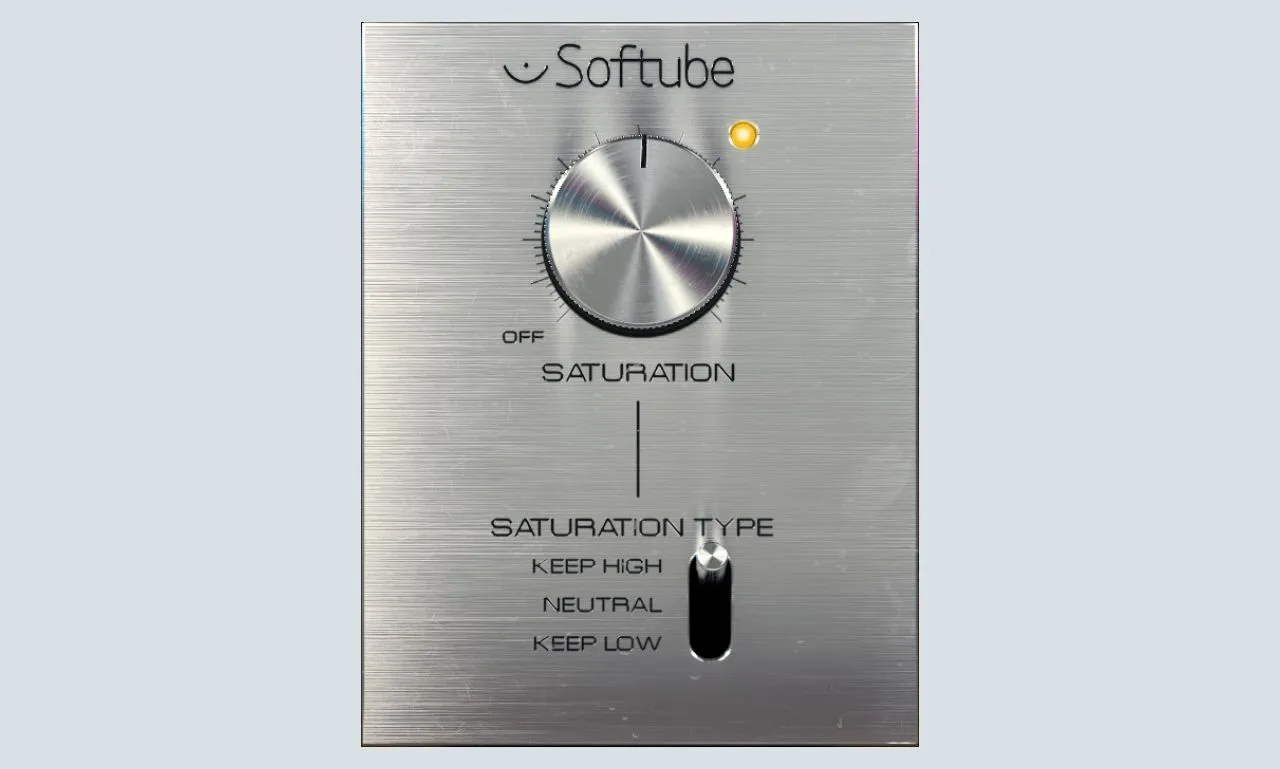
- Disclosure: Some links in this article are affiliate links. We may earn a small commission if you make a purchase, at no extra cost to you.
There is a short list of free plugins that every serious producer has installed on their computer.
The Softube Saturation Knob is on that list.
The Saturation Knob, released by Softube in 2015, is now one of the most popular free plugins. You will find it on the sessions of bedroom producers, semi-professional engineers, and even seasoned veterans who have access to thousands of dollars’ worth of paid alternatives.
Why? Because it sounds genuinely good. Because it is dead simple to use. And because it is completely free.
But here is the real question: in 2026, with so many free and paid saturation plugins available, does the Softube Saturation Knob still hold up? Or has it been overtaken by newer, more feature-rich alternatives?
That is exactly what we are going to find out in this review.
Quick Verdict
Feature | Score |
Sound Quality | ⭐⭐⭐⭐⭐ |
Ease of Use | ⭐⭐⭐⭐⭐ |
CPU Efficiency | ⭐⭐⭐⭐⭐ |
Versatility | ⭐⭐⭐⭐ |
Overall Rating: 9.5 / 10 ⭐⭐⭐⭐⭐
- ✅ Best For: Drums, bass, vocals, guitars, bus saturation.
- ❌ Not Ideal For: Complex, multi-band saturation needs.
- 💰 Price: Completely Free.
What Does Softube Saturation Knob Do?
The Softube Saturation Knob is a harmonic saturation plugin. In simple terms, it takes your audio signal and adds harmonic distortion to it in a musical, controlled way.
Harmonic saturation is one of the most powerful tools in mixing because it:
- Adds warmth to thin, digital-sounding tracks.
- Creates harmonic richness that makes sounds feel fuller and more alive.
- Adds perceived loudness without increasing the actual peak level.
- Helps tracks cut through a mix by generating upper harmonics that the ear naturally focuses on.
- Glues elements together on a bus or master channel.
In the analog world, this kind of saturation happened naturally when audio passed through tape machines, tube amplifiers, and transformer-based hardware. In the digital world, plugins like the Softube Saturation Knob recreate these characteristics artificially, and when done well, the results are indistinguishable from the real thing.
The Single Knob Design Philosophy
The most striking thing about the Softube Saturation Knob is its interface: there is literally one knob.
You turn it clockwise to add more saturation. You turn it counter-clockwise to reduce it. That is it.
This might sound overly simplistic, but it is actually a stroke of genius. Saturation is one of those tools that works best when you apply it by ear rather than by numbers. A single knob forces you to trust your ears instead of overthinking the technical details. You add saturation until it sounds right, and then you stop.
The 3 Saturation Types
The Softube Saturation Knob has one main saturation knob and a 3-position switch that lets you choose how the saturation affects the frequency spectrum.
➤ Keep High
- Preserves high frequencies during saturation.
- Reduces saturation in the low end.
- Best for: Bass, sub bass, kick drums (avoids muddy low end).
- Why use it: When you want to add harmonics without losing top-end clarity.
➤ Neutral
- Equal saturation across the entire frequency spectrum.
- Flat, transparent saturation.
- Best for: Vocals, full mixes, bus saturation.
- Why use it: When you want overall warmth without emphasizing any specific frequency range.
➤ Keep Low
- Preserves low frequencies during saturation.
- Reduces saturation in the highs.
- Best for: Cymbals, hi-hats, bright synths.
- Why use it: When you want to tame harsh highs while keeping the body of the sound.
Pros & Cons
✅ Pros
- Completely free: no trial period, no subscription, no hidden costs.
- Zero CPU usage when bypassed: you can insert it on every channel without penalty.
- 3 types of saturation: Keep High, Neutralstor, and Keep Low.
- Simple interface: one knob means you mix with your ears, not your eyes.
- Works on any track: drums, bass, vocals, guitars, synths, and buses all respond well.
- Made by Softube: a professional audio company with a proven track record.
- Regularly updated: still receiving compatibility updates in 2026.
- Available formats: 64-bit VST2/VST3/AU/AAX plugin format for Windows & macOS.
❌ Cons
- Only one knob: limited fine-tune control compared to paid alternatives.
- No dry/wet mix knob: you cannot easily blend the saturated signal with the dry signal.
- No mid/side processing: cannot saturate only the sides of a stereo signal.
- No output gain compensation: saturation adds volume, so you need to manually compensate.
- No multiband processing: cannot apply different saturation to different frequency ranges.
FAQ:
How is the Saturation Knob different from the Soundtoys Decapitator?
The Decapitator offers more control, a dry/wet mix knob, five saturation styles, and a more complex user interface. For most mixing tasks, the Saturation Knob achieves a comparable result. Soundtoys Decapitator is worth the investment if you need more fine-tuned control and are working at a professional level where session recall and precision are essential.
Does saturation add volume to my signal?
Yes! Adding saturation generates harmonics and increases the perceived loudness of your signal. You may need to manually compensate for this by reducing the output level of the channel after applying saturation.
Can I use multiple instances of the Saturation Knob on the same session?
Yes, and this is one of the plugin’s biggest strengths. Because the CPU usage is so low, you can insert the Saturation Knob on every single channel in your session without any meaningful impact on your computer’s performance. This makes it ideal for mixing engineers who want to add subtle saturation to every element of a mix.
Final Thoughts
The Softube Saturation Knob is one of the best free plugins ever made!
The single-knob interface might look too simple at first glance, but that simplicity is the point. Saturation is a tool that should be applied by ear, and the Saturation Knob forces you to do exactly that.
The lack of a dry/wet knob and preset system are legitimate criticisms, but they are minor inconveniences rather than dealbreakers. For basic to intermediate saturation duties, the Softube Saturation Knob delivers results that rival plugins costing $100 or more.
In 2026, with over a decade of mixing sessions behind it, the Softube Saturation Knob remains our first recommendation for anyone asking which free plugin they should download first.
You Might Also Like:
- 10 Best Free Saturation VST Plugins for Warmth
- 15 Best Free Drum VST Plugins for Punchy Beats
- 12 Best Free Reverb VST Plugins for Lush Vocals
- 15 Best Free Synth VST Plugins in 2026 (Serum Alternatives)
- 8 Best Free Autotune VST Plugins for Vocals

AudioPluginList Team
We are a collective of music producers, sound designers, and audio engineers. We rigorously test every plugin in our studios to ensure it deserves a spot in your workflow. Our mission is to help you make pro music on any budget. Read More »