
Deelay by Sixth Sample Review | Free Delay Plugin

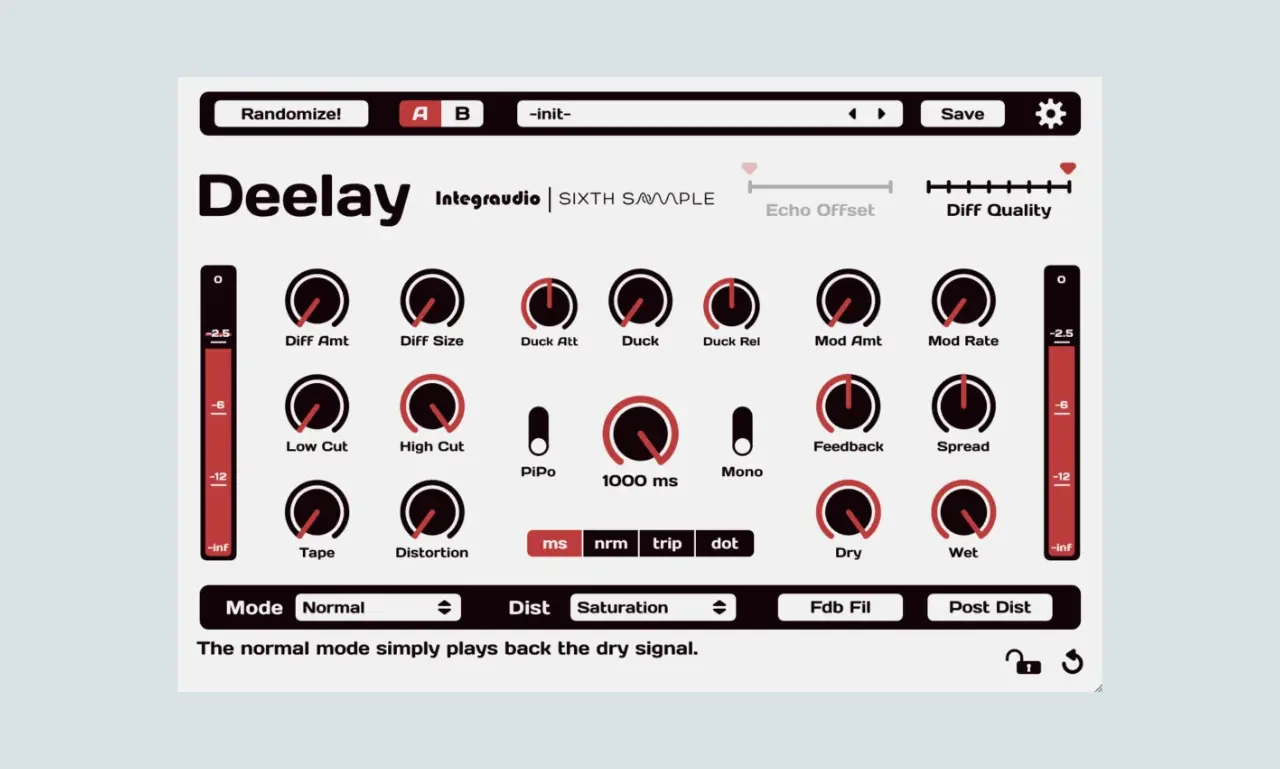
- Disclosure: Some links in this article are affiliate links. We may earn a small commission if you make a purchase, at no extra cost to you.
The Deelay by Sixth Sample is a free delay plugin that genuinely competes with paid delay plugins costing $50 to $150. It includes ducking, modulation, diffusion, tape character, distortion, post-distortion processing, filtered feedback, stereo controls, and even a randomize function to spark creativity, all in one clean, modern interface.
But the real question is, does it actually sound good? And how does it stack up against paid alternatives like Soundtoys EchoBoy or FabFilter Timeless?
That is exactly what we are going to find out in this review.
Quick Verdict
Feature | Score |
Sound Quality | ⭐⭐⭐⭐⭐ |
Ease of Use | ⭐⭐⭐⭐ |
Features | ⭐⭐⭐⭐⭐ |
CPU Efficiency | ⭐⭐⭐⭐ |
Overall Rating: 9.4 / 10 ⭐⭐⭐⭐⭐
- ✅ Best For: Vocals, guitars, synths, drum effects, creative sound design.
- ❌ Not Ideal For: Complete beginners who want a one-knob solution.
- 💰 Price: Completely Free.
What Does Deelay Plugin Do?
Deelay is a feature-rich delay plugin that combines multiple delay processing concepts into a single intuitive interface:
- Standard delay: with tempo sync and free-time modes.
- Ducking: to keep your dry signal clear (vocals, leads, etc.).
- Modulation: for chorus-like movement in the repeats.
- Diffusion: to blur repeats into reverb-like textures.
- Tape character: for analog warmth.
- Distortion and saturation: in the feedback path.
- Filtered feedback: to shape the tone of repeats over time.
What sets Deelay apart from most free delay plugins is the depth of control it offers without becoming overwhelming. The layout is logical, the labels are clear, and the workflow is efficient once you understand it.
Key Features & Controls Explained
This is where Deelay really shines. Let us break down every control on the interface and explain what it does and how to use it.
Top Bar Controls
Control | What It Does? |
Randomize! | Randomizes all parameters for instant creative inspiration |
A / B | Compares two different settings without losing your work |
Preset Browser | Load and navigate through presets with arrow buttons |
Save | Save your own custom presets |
Settings (Gear Icon) | Plugin settings and preferences |
Echo Offset | Offsets the timing of the echoes for stereo movement |
Diff Quality | Sets the quality of the diffusion algorithm |
Diffusion Section
The diffusion controls are what allow Deelay to blur the line between delay and reverb:
- Diff Amt (Diffusion Amount): Controls how much the repeats are diffused. Higher values create reverb-like washes from your delay.
- Diff Size: Sets the size of the diffusion algorithm. Larger sizes create longer, more spacious diffusion tails.
Ducking Section
One of Deelay’s standout features. Ducking automatically lowers the delay volume when the dry signal is present:
- Duck Att (Ducking Attack): How fast the ducking engages when the dry signal hits.
- Duck: The amount of ducking applied (how much the delay drops in volume).
- Duck Rel (Ducking Release): How fast the delay returns to full volume after the dry signal stops.
These are essential for vocal delays; it keeps your delay from clashing with the lead vocal but allows the repeats to fill the gaps between phrases.
Modulation Section
The modulation adds movement and life to the repeats:
- Mod Amt (Modulation Amount): How much pitch modulation is applied.
- Mod Rate: Speed of the modulation.
A small amount of modulation creates a chorus-like effect on the repeats. Higher values create more obvious pitch-shifting that sounds dreamy and otherworldly.
Filtering Section
Filters in the feedback loop are essential for keeping repeats from becoming muddy:
- Low Cut: Removes low frequencies from the repeats.
- High Cut: Removes high frequencies from the repeats (great for “darkening” repeats over time).
Character Section
These controls add analog character to your delay:
- Tape: Adds tape-style saturation and warmth to the repeats.
- Distortion: Adds harmonic distortion for grit and edge.
Stereo & Mix Section
- PiPo (Ping-Pong): Toggles ping-pong delay (bounces between left and right channels).
- Mono: Switches to mono operation.
- Feedback: Controls how many times the delay repeats.
- Spread: Controls the stereo width of the delay.
- Dry: Volume of the unprocessed signal.
- Wet: Volume of the delay signal.
Time Section
The central time control with multiple sync options:
- Time Display: Sets the delay time.
- ms: Free time mode (in milliseconds).
- nrm (Normal): Tempo-synced straight notes.
- trip (Triplet): Tempo-synced triplet notes.
- dot (Dotted): Tempo-synced dotted notes.
Bottom Bar Controls
- Mode: Selects the main delay mode (Normal, etc.).
- Dist (Distortion): Selects the type of distortion (Saturation, etc.).
- Fdb Fil (Feedback Filter): Enables filtering specifically in the feedback path.
- Post Dist (Post Distortion): Applies distortion after the delay processing.
Tooltip System
Like all modern plugins, Deelay shows a description of each control at the bottom of the interface.
Pros & Cons
✅ Pros
- Completely free with no nag screens, trials, or limitations.
- Professional ducking feature: rarely found in free delay plugins.
- Diffusion controls: blur delay into reverb-like textures.
- Multiple time modes: ms, normal, triplet, and dotted for tempo flexibility.
- Tape and distortion: controls for analog character.
- The modulation section: it adds movement and life to repeats.
- Low-Cut / High-Cut filters: keep repeats from becoming muddy.
- Ping-pong and Mono switches: for stereo flexibility.
- Randomize button: for instant creative inspiration.
- A/B comparison: for quick setting comparisons.
- Clean, modern interface that does not feel overwhelming.
- Self-documenting with bottom-bar tooltips.
- Free for commercial use.
❌ Cons
- No multi-tap delay for complex rhythmic patterns.
- Limited algorithm variety compared to Valhalla Delay’s modes.
- Steep learning curve for absolute beginners due to many controls.
- No tap tempo button for setting delay times manually.
- Modulation can become artifacted at extreme settings.
- No reverb send/output routing for advanced setups.
FAQ:
How much CPU does Deelay use?
Deelay uses moderate CPU resources, especially with high diffusion quality settings and long delay times. On a modern computer, you can run multiple instances without issue.
How do I avoid muddy delay repeats?
Use the Low Cut and High Cut filters in Deelay to remove problem frequencies from your repeats. Setting the Low Cut around 200–300 Hz and the High Cut around 5–8 kHz will keep your repeats clean and clear in the mix.
What is the Randomize button for?
The Randomize button randomizes all parameters at once, instantly generating new settings. It is excellent for creative inspiration when you are stuck or want to discover unexpected sound combinations.
What is the ducking feature for?
The ducking feature keeps your lead vocal (or any source signal) clear and intelligible while still allowing the delay repeats to fill the gaps between phrases. It is essential for modern vocal mixing.
How much CPU does Deelay use?
Deelay uses moderate CPU resources, especially with high diffusion quality settings and long delay times. On a modern computer, you can run multiple instances without issue.
Final Thoughts
The Deelay by Sixth Sample is one of the most generous free plugin releases of the past few years.
Is it perfect? No. It only lacks that vintage character variety of paid alternatives like Valhalla Delay or the multi-tap routing of FabFilter Timeless 3. But for the price of zero dollars, the value is genuinely incredible.
You Might Also Like:
- Valhalla Supermassive Review | Free Reverb Plugin
- Softube Saturation Knob Review (Free Saturation Plugin)
- 8 Best Free Autotune VST Plugins for Vocals
- 12 Best Free Reverb VST Plugins for Lush Vocals
- 10 Best Free Saturation VST Plugins for Warmth

AudioPluginList Team
We are a collective of music producers, sound designers, and audio engineers. We rigorously test every plugin in our studios to ensure it deserves a spot in your workflow. Our mission is to help you make pro music on any budget. Read More »