
Reason Free Review

In this Reason Free review, i tested Reason Studios’ massive new release in my studio sessions.
I installed this completely free edition of the legendary Reason Rack plugin across multiple DAWs. It features 15 legendary devices, including instruments, creative effects, utilities, and MIDI generators.
Review Overview
The 15 Included Devices in Reason Free
Reason Free does not give you stripped-down demo units. It includes 15 full-featured devices from the Reason ecosystem.

1. Instruments
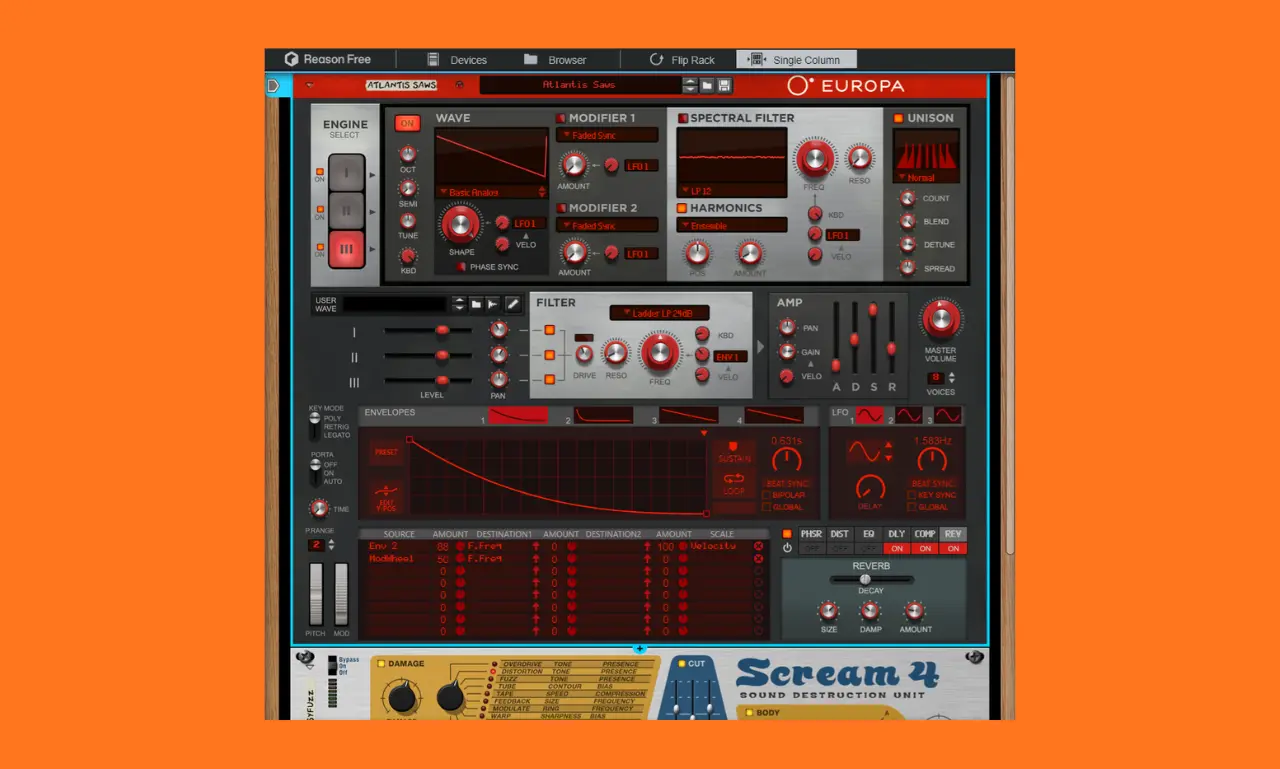
- Europa Wavetable Synthesizer: Europa is Reason’s flagship wavetable monster synth.
When I initialized a clean patch and began morphing the wave engines, the wavetable visualization on screen updated instantly with zero graphic lag. It effortlessly handled everything from aggressive EDM saw stacks to shimmering ambient textures. - Kong Drum Designer: An elite 16-pad drum machine.
I loaded up a factory 808 kit and used the per-pad physical modeling to tighten up the decay of the kick drum, which gave my trap beat an incredibly punchy low-end. - Monotone Bass Synthesizer: A dedicated analog-modeled monophonic synth designed specifically for deep sub-bass lines, squelchy acid bass, and punchy synth leads.
Its simple interface makes this hardware a reliable choice for quick, heavy sub-bass during studio sessions. - ID-8 Multi-Instrument: A lightweight, fast multi-instrument device packed with essential acoustic pianos, electric pianos, organs, strings, brass, and utility drum kits.
These simple electric pianos and acoustic strings deliver a classic vibe that sits well in busy mixes. - MIDI Out Device: You can route MIDI CV information out of the rack to external hardware or secondary DAW tracks.
2. Effects
- Scream 4: One of the most famous saturation and distortion plugins in audio history. It features 10 distortion algorithms (including Tube, Tape, Fuzz, Overdrive, and Digital) alongside body EQ filters.
I inserted a clean digital drum loop into the ‘Tape’ mode and increased the drive parameter. This adjustment immediately added a warm, cohesive harmonic glue, effectively softening the harsh transients of the snare. - The Echo: A pristine tape and digital delay unit featuring pitch-shifter feedback loops, ducking, auto-pan, and analog tape wobble.
I automated the analog tape wobble parameter on a clean vocal track, and it instantly dialed in a beautifully unstable, vintage lo-fi character that gave the chorus a massive depth. - RV7000 MKII Advanced Reverb: A high-end algorithmic reverb offering room, hall, plate, impulse response (convolution), and gated reverb models.
In my mixing tests, the long decay times produced a smooth, dense reverb tail with no metallic artifacts. - Audiomatic Retro Transformer: You can add instant retro lo-fi flavor across Tape, Vinyl, VHS, Telephone, and Radio modes using a single knob.
I applied the Telephone and Radio algorithms to background vocals to isolate the mid-range frequencies against the main lead. - MClass Maximizer: A mastering-grade brickwall limiter and loudness maximizer with soft-clip capabilities to keep your rack outputs clean.
I tested it on a master chain; it boosts loudness transparently while keeping transients up to 3–4dB of gain reduction.
3. Utilities
- Combinator: The heart of Reason’s workflow.
The Combinator lets you combine multiple synths, drums, and effects into a single custom instrument with macro controls.
I used it to layer a heavy Monotone sub-bass under an evolving Europa pad. Mapping a single macro knob to both filters worked flawlessly; it unlocks massive sound design possibilities. - Pulsar Dual LFO: A flexible modulation generator that routes complex low-frequency oscillation curves to any device parameter via CV cabling.
I cabled Pulsar’s LFO 1 output directly into Europa’s main filter cutoff on the back panel, and the modulation was perfectly smooth! - Spider Audio Merger/Splitter: Splits or merges audio signals for parallel processing chains.
I used it to split a synth line so I could heavily distort the high frequencies while leaving the low-end perfectly clean. - Spider CV Merger/Splitter: Splits or merges Control Voltage (CV) modulation signals to control multiple knobs from a single modulation source.
During my routing tests, this was a lifesaver for tying the movement of three separate instruments back to a single master clock source.
4. MIDI Player Devices
- Scales & Chords: A transformative MIDI FX tool. It locks your keyboard to any selected musical scale and automatically generates complex, professional chord progressions from single keys, with no music theory required.
I put this to G-Minor and instantly got an incredible chord progression that started my production workflow.
The Back-Panel Cabling
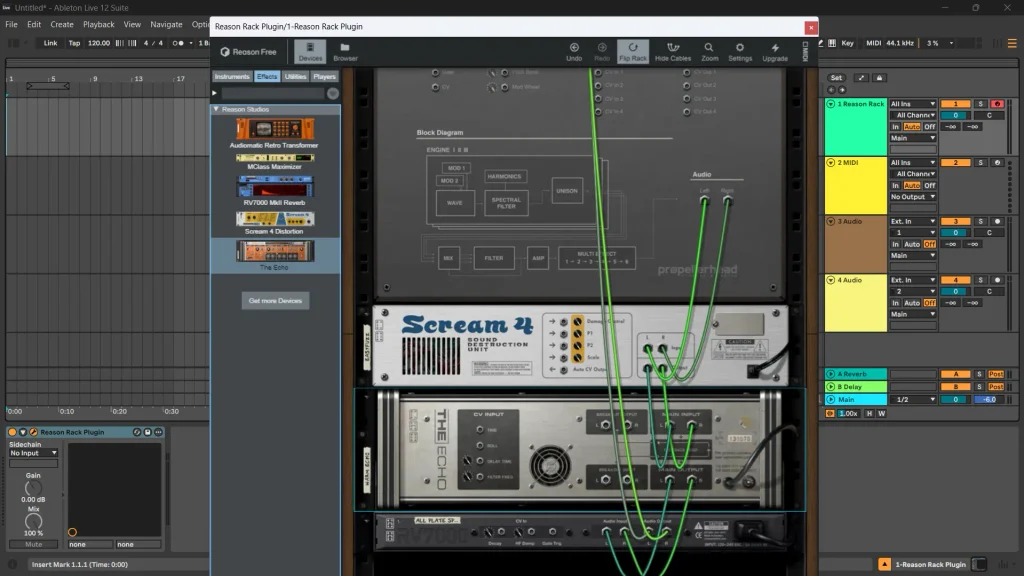
The feature that makes Reason Free vastly superior to standard plugin bundles is its virtual cabling system.
By pressing the Tab key on your keyboard (or clicking the flip button), the entire virtual rack spins around 180 degrees to reveal an interactive back panel.
➤ What You Can Do Behind the Rack:
- Sidechain Ducking: Route audio from Kong’s kick pad into the sidechain input of Scream 4 or RV7000 to automatically duck reverb tails whenever the kick hits.
- LFO Modulation: Cable Pulsar’s Dual LFO outputs directly into Europa’s wavetable position or Scream 4’s distortion drive for breathing, evolving textures.
- Parallel Audio Splitting: For example, you can use Spider Audio to split an ID-8 piano signal into two paths. Process one signal clean and drive the second through heavy distortion and pitch-shifted delay before blending them back together.
FAQ:
Can I use Reason Free only for effects?
Yes. Reason Free includes effects such as Scream 4, The Echo, RV7000 MKII, Audiomatic, and the MClass Maximizer. You can use the Rack as an effects environment for creative distortion, delay, reverb, vintage texture, and limiting within your existing DAW workflow.
Can I load third-party VSTs inside Reason Free?
Yes, but only in standalone mode. If you use the standalone Reason Free DAW application, you are permitted to load your own third-party VST plugins on any of your 16 tracks. However, if you are using the Reason Rack as a plugin inside another host DAW (like Ableton or FL Studio), you cannot nest external VSTs inside the Reason Rack plugin interface itself.
Does Reason Free require a constant internet connection?
No. You only need an internet connection for the initial download, installation, and authorization when you first log into your Reason Studios Account. Once authorized, the software can run entirely offline, making it perfectly stable for live performance laptops or offline studio rigs.
Can I open projects made in Reason Free in the paid versions?
Yes. Any project files, custom presets, or complex Combinator patches you build within the free version are 100% forward-compatible. If you eventually upgrade to Reason 14 or a Reason+ subscription, all of your work will carry over seamlessly.
Can I add extra Rack Extensions to Reason Free without buying full Reason?
Yes! Reason Free includes full Rack Extension (RE) format support. You can download free third-party Rack Extensions or purchase individual instruments and effects from the Reason Studios shop and run them natively inside Reason Free, without ever needing to purchase the $499 Reason DAW or Reason+ subscription.
What is the biggest limitation of the standalone Reason Free version?
The standalone Reason Free software includes a mixer and sequencer, but it is limited to 16 combined audio and MIDI tracks. If you mainly work in Ableton, FL Studio, Logic, or another DAW, you can avoid this limitation by loading the Reason Rack as a plugin inside your main DAW.
Final Thoughts
Reason Free brings the legendary modular hardware workflow into your DAW for zero dollars, and it delivers an incredible depth and character to your sound. You can use it as an ultra-powerful wavetable synth, a drum design environment, a vintage lo-fi multi-fx unit, or a MIDI chord generator. Download it, hit the Tab key, and experience the magic of virtual patch cables today.
➤ Supported Formats
- Plugin Formats: VST3, AU (Audio Units), and AAX, allowing it to run inside host digital audio workstations like Ableton Live, FL Studio, Logic Pro, and Pro Tools.
- Standalone DAW: Functions as a lightweight 16-track recording environment that also supports external VST plugins.
➤ Compatibility Requirements
- Windows: Windows 10 or 11 (64-bit, multi-core CPU).
- macOS: macOS 11 or later (Intel or Apple Silicon, 64-bit).
- Display: Minimum monitor resolution of 1280 x 768.
➤ You Might Also Like:
- Voxengo Span Review | Free Spectrum Analyzer Plugin
- TDR Nova Review | Free Dynamic EQ Plugin
- Xfer Records OTT Review | Free Multiband Compressor Plugin
- Deelay by Sixth Sample Review | Free Delay Plugin
- Valhalla Supermassive Review | Free Reverb Plugin

Amine Fariss is the founder of AudioPluginList and has been producing music since 2005. He writes about audio plugins and music production equipment, combining hands-on testing with research from official sources.
A great step from Reasonstudios to anounce this amazing free version, with all the free RackExtensions at their Shop page you can install, it’s a full DAW with 16tracks, so more than enough for beginners. Now with the renewed sequencer, the audio and midi editing functions, R14 getting on par with the other DAW’s.
I’m Reason user since V2.5, maybe this software was a nightmare for more streamlined music makers in the past, especialy of the limited sequencer features, but now it’s only missing track markers and stem separation, so nothing what’s so so important.
You are absolutely right! The updates have modernized the workflow, and the 16-track cap is perfect for beginners. Releasing this free tier is a massive move for the music production community. Thanks again for sharing your insights as a long-time Reason user! 😊