
Youlean Loudness Meter 2 Review | Free LUFS Meter Plugin

- Disclosure: Some links in this article are affiliate links. We may earn a small commission if you make a purchase, at no extra cost to you.
Most traditional peak meters only measure maximum digital voltage. They do not show how human ears perceive volume. Because of this limitation, relying on peak meters often leads to flat, over-compressed masters.
Youlean Loudness Meter 2 solves this exact issue. Created by developer Julius Youlean, this plugin analyzes perceived loudness, True Peak levels, and dynamic range.
We inserted the Youlean Loudness Meter 2 onto our master bus during several mixing and mastering sessions. We tested its accuracy against hardware analyzers and paid software suites.
Quick Verdict
Feature | Score |
Accuracy & Precision | ⭐⭐⭐⭐⭐ |
Target Presets | ⭐⭐⭐⭐⭐ |
Ease of Use | ⭐⭐⭐⭐⭐ |
CPU Efficiency | ⭐⭐⭐⭐⭐ |
Overall Rating: 9.8 / 10 ⭐⭐⭐⭐⭐
- ✅ Best For: Mastering engineers, music producers, podcasters, video editors, and film sound designers.
- ❌ Not Ideal For: Producers looking for an automated limiter or artificial intelligence mastering tool.
- 💰 Price: Free (Optional: $39 PRO upgrade).
What Is Youlean Loudness Meter 2?
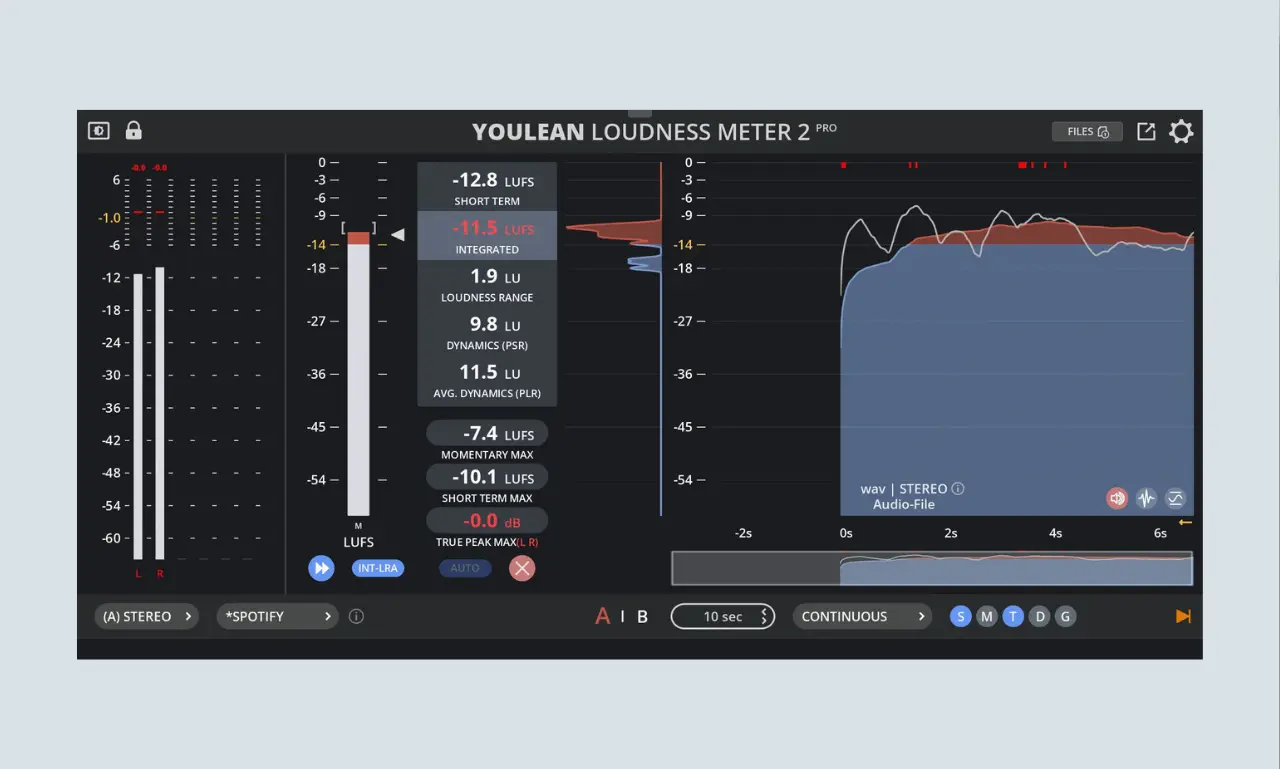
Youlean Loudness Meter 2 is an audio analysis plugin. It measures perceived loudness using international standards like ITU-R BS.1770 and EBU R128.
Julius Youlean built this plugin to help creators pass strict broadcast and streaming requirements. It displays loudness in LUFS (Loudness Units Full Scale).
The plugin runs smoothly inside all major digital audio workstations and video editing applications.
Key Metrics & Technical Terms
Youlean Loudness Meter 2 presents complex audio data in a clear interface. Here is a breakdown of the key metrics.
1. Integrated LUFS (The Main Number)
The Integrated LUFS measures the average loudness of a complete track from beginning to end. Streaming services read this specific number to apply automatic volume adjustments.
2. Short-Term & Momentary LUFS
Short-Term LUFS calculates the loudness over a moving three-second window. It helps you monitor volume shifts between verses and choruses. Momentary LUFS measures the volume across a fast 400-millisecond window to catch sudden bursts.
3. True Peak (dBTP)
True Peak measures potential inter-sample peaks that may occur during digital-to-analog conversion or lossy encoding. A master can appear safe on a normal peak meter but still clip after conversion. True Peak metering helps prevent this.
4. LRA and PLR (Dynamics Metrics)
LRA (Loudness Range) indicates the volume difference between quiet and loud sections of your song.
PLR (Peak to Loudness Ratio) measures the overall punch. Higher PLR values mean your mix retains its dynamic punch rather than sounding crushed.
Free vs. PRO Version
Youlean Loudness Meter 2 is available in a fully functional Free Version and a paid PRO Version that unlocks advanced workflow, export, and visualization tools.
Feature / Capability | Free Version | PRO Version ($39) |
Real-time & Offline Metering | Yes (Integrated, Short-term, Momentary, True Peak) | Yes |
Channel Support | Mono, Stereo, and 5.1 Surround | Mono, Stereo, and Surround/Multichannel |
Loudness Distribution & Histogram | Yes | Yes (with advanced configuration modes) |
Streaming & Broadcast Presets | Basic / Manual targets | Yes (Dedicated presets for Spotify, Apple Music, Netflix, TV, etc.) |
Dynamics Graph | No | Yes (Visualizes dynamic range to prevent over-compression) |
Drag & Drop File Analysis | No | Yes (Quickly analyze audio files outside or inside the DAW) |
Export Reports | No | Yes (Export analysis as PDF, PNG, or SVG) |
A/B Save States & Custom Presets | No | Yes (Save custom presets and compare A/B states) |
GUI Customization | Standard theme | Yes (Dark and light themes, plus text scaling) |
Updates | Standard updates | Lifetime free updates included with Pro license |
Pros & Cons
✅ Pros
- The free version includes the most important loudness measurements.
- Measures Integrated, Short-Term, and Momentary LUFS.
- Includes True Peak metering.
- Clear loudness history graph.
- Includes accurate target presets for major streaming platforms.
- Lightweight and easy to place on the master bus.
- Resizable vector interface looks sharp on 4K monitors.
- Excellent for music, podcasts, YouTube, and streaming preparation.
❌ Cons
- Drag-and-drop file analysis requires the PRO license.
- The plugin only analyzes audio; it does not process or limit signals.
- It does not replace a spectrum analyzer for frequency balancing.
FAQ:
Where should I place this plugin in my signal chain?
You can place the Youlean Loudness Meter 2 as the very last plugin on your master bus. It must sit after all limiters, EQs, and dithering processors.
What LUFS should I aim for?
There is no single perfect LUFS target. It depends on your genre, arrangement, dynamics, and release format. Use Youlean Loudness Meter 2 to understand your track’s loudness, compare it with suitable reference tracks, and avoid excessive clipping or over-compression.
Can I use the Youlean Loudness Meter 2 with Voxengo SPAN?
Yes. They work well together. Use the Youlean Loudness Meter 2 for LUFS, True Peak, and loudness range. Use Voxengo SPAN for frequency balance, low-end analysis, stereo width, and phase correlation.
Is the Youlean Loudness Meter 2 good for Spotify and YouTube?
Yes. It is useful for checking loudness before uploading to Spotify, YouTube, Apple Music, and other services. However, always check current platform guidelines because loudness normalization policies can change.
Does the Youlean Loudness Meter 2 work in video editors?
Yes, it runs as an AU, VST, or VST3 plugin inside DaVinci Resolve, Adobe Premiere Pro, and Final Cut Pro.
Final Thoughts
Youlean Loudness Meter 2 is the best free metering plugin available today and an essential utility for modern audio production. It gives you clear visual feedback about volume, dynamics, and peak levels.
We keep it permanently on our master monitoring chain. It ensures our tracks translate consistently across all playback systems.
➤ Supported Formats
Youlean Loudness Meter 2 is available as a Standalone Application, a Command Line Tool, and multiple plug-in formats.
- VST2: Supported by older and standard Digital Audio Workstations (DAWs).
- VST3: Compatible with modern VST3-standard DAWs on Windows and macOS.
- AU (Audio Unit): Built specifically for macOS and AU-supporting hosts like Logic Pro.
- AAX: Designed for Avid Pro Tools on both Windows and macOS.
➤ You Might Also Like:
- Voxengo Span Review | Free Spectrum Analyzer Plugin
- Reason Free Review | Essential Virtual Rack Plugin
- TDR Nova Review | Free Dynamic EQ Plugin
- Deelay by Sixth Sample Review | Free Delay Plugin
- Valhalla Supermassive Review | Free Reverb Plugin
We are a collective of music producers, sound designers, and audio engineers with more than 25 years of experience in the music industry. We rigorously test every plugin/hardware in our studios to ensure it deserves a spot in your workflow.